.png?width=193&height=27&name=ClickPost%20Logo%20(Blue).png)
.svg)
.svg)
.svg)
.svg)
.webp?width=286&height=206&name=ROI%20Calculator%20(2).webp)
.svg)
.svg)
.svg)
.svg)
.svg)
.svg)
.svg)
.svg)
.svg)
.webp?width=286&height=206&name=Frame%201171276203%20(11).webp)
.svg)
.svg)
.svg)
.svg)
.webp?width=286&height=206&name=ROI%20Calculator%20(3).webp)
.svg)

.svg)
.svg)

.svg)
.webp?width=286&height=206&name=ROI%20Calculator%20(4).webp)
Self-Serve Returns Portal vs. Email: Which Is Better?


Ready to delight customers after checkout?
Trusted by 600+ brands
In this blog
TL;DR Summary
For mid-market DTC brands, how returns are handled directly shapes labor costs, refund speed, and seasonal resilience as order volume grows. The gap between manual email workflows and automated portals widens fast once monthly returns climb past 80.
-
Labor Cost Crossover – Email costs 3–6x more per return than portals
-
80-Return Threshold – Volume where portal savings typically outweigh setup cost
-
Policy Complexity Signal – Three-plus rules make email inconsistent and error-prone
-
Peak-Season Scalability – Portals absorb Q4 spikes without overtime headcount
-
Exchange Conversion Lift – Portal-first flows drive 15–30% more exchanges over refunds
-
Structured Return-Reason Data – Turns return feedback into actionable product intelligence
-
3PL and OMS Connectivity – Portals eliminate manual handoffs to warehouse systems
A customer wants to return an item. Instead of emailing your team and waiting for a label, they open your branded portal. There, they check eligibility, generate a prepaid or QR-code label, and choose a refund or exchange without involving customer service at every step.
For a mid-market DTC brand, that shift matters as volume grows. A manageable inbox can become a recurring cost center, visible in your labor, response times, policy exceptions, and disconnected systems. Understanding how the ecommerce returns process works end to end is the first step toward knowing where those costs accumulate.
When Email Returns Start to Strain the Team
According to Shopify's customer expectations research, 67 percent of customers expect a refund within 7 days. If you use email, the first response may take 2 to 4 business days, leaving little time to verify, label, receive, and refund the item.
At low volume, you may absorb the delay. Near 80 to 100 monthly returns, repeated checks, labels, updates, and exceptions push up labor and SLA risk.
We will show you where costs cross over, when email still works, and how policy complexity, 3PL signals, and peak season change the decision.
What Email Returns Cost You at Mid-Market Volume
Start with labor. Based on Bureau of Labor Statistics wage data adjusted for benefits, your US mid-market customer service rep costs about $22 to $28 per hour. At 18 to 22 minutes per return email, you spend roughly $8 to $12 before any other cost appears.
At 300 returns a month, you may spend $2,400 to $3,600 on labor before adding software, carrier charges, or losses from fraudulent and non-resalable returns. Research on how much returns cost retailers shows that labor is consistently one of the largest and most underestimated line items.
The Costs You Will Not See in the Labor Calculation
Labor is only the visible cost. Reps may interpret the same exception differently, creating disputes and rework. Because your inbox lacks photo checks and structured reason codes, fraud is harder to flag and product teams get little usable data. Those return reason codes are exactly what a portal captures automatically at intake.
Self-Serve Returns Portal vs. Email: A 10-Dimension Comparison
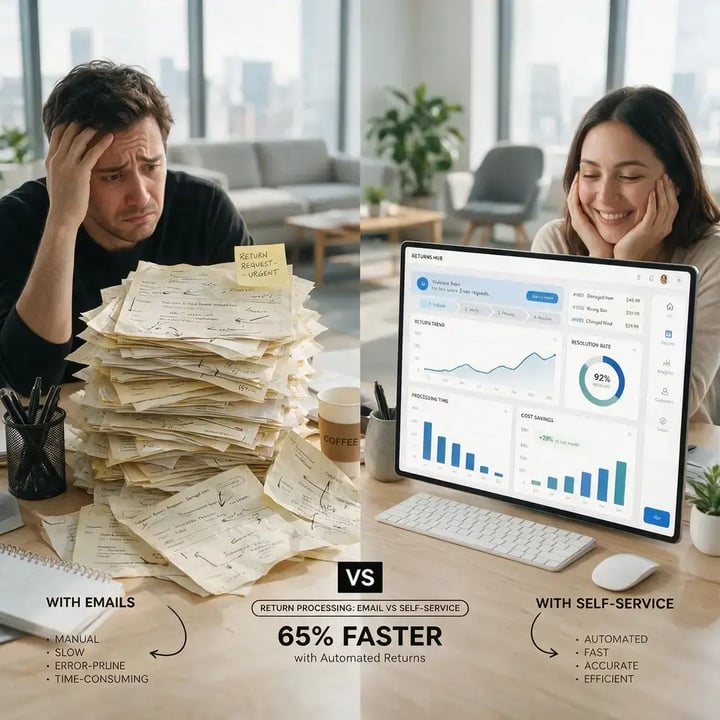
Compare both workflows across cost, speed, consistency, data, and scale. Email gives you almost no setup burden. A portal takes implementation upfront but removes repeated work as returns grow.
| Dimension | Email-Based Returns | Self-Serve Returns Portal |
| Estimated handling cost per return | $8 to $12 (CS labor) | $1 to $3 (platform fees) |
| Average first response time | 2 to 4 business days | Instant (automated) |
| SLA consistency | Depends on rep and inbox load | Rules-based; consistent unless overridden |
| Exchange conversion | Often refund-led | Estimated 15 to 30% higher with exchange-first flow; see instant exchange vs. refund-first returns |
| Fraud controls | Manual; limited intake checks | Photo review and reason-code flags |
| Return-reason data | Unstructured in email threads | Structured and queryable |
| Peak-season capacity | Requires overtime or temporary CS | Scales without added CS headcount |
| Policy enforcement | Rep-dependent | Automated with approved overrides |
| Implementation | Already in use | 2 to 6 weeks for mid-market integration |
| Monthly cost at 300 returns | $2,400 to $3,600 (labor) | $550 to $1,550 (subscription + fees) |
Two rows usually drive your budget discussion: cost per return and monthly cost at 300 returns. Together, they show whether labor has already passed the cost of automation. For a deeper look at how these numbers translate to business outcomes, the returns management ROI metrics that matter most can help you build the internal case.
Five Questions to Help You Decide When to Move Beyond Email
We use five questions to frame the decision. Volume starts the math; policy complexity, seasonal pressure, AOV, and 3PL connectivity explain when you should move.
1. Are you processing more than 80 returns per month?
Below 80 returns, your labor may still cost less than a portal. Above that, the monthly bill often crosses subscription cost once follow-ups and exceptions are included. If you are unsure whether to automate returns or keep it manual, running this volume check is usually the clearest starting point.
2. Does your return policy have more than 3 conditional rules?
If your policy changes by category, window, channel, or customer segment, your team must interpret each request. A portal applies the rules consistently and sends only exceptions to you. A weak or inconsistently applied policy can also affect sales; consider whether your return policy is losing you sales before you build more complexity into email handling.
3. Are you missing SLAs during Q4 or January?
Q4 reveals whether your inbox can scale. Once first-response times pass 3 business days, refund resolution slips. Automation clears the backlog without overtime or temporary coverage. Brands that have mapped out a holiday returns process in advance consistently outperform those that respond reactively to the January surge.
4. Is your average order value below $300?
You may prefer concierge email handling for luxury, bespoke, or B2B orders needing individual review. Below $300 AOV, manual labor becomes harder to justify as volume grows. Understanding average order value by industry can give you a useful benchmark for where your brand sits relative to peers making the same decision.
5. Does your 3PL or OMS need return signals?
If your 3PL WMS or OMS needs return signals, email adds a handoff. Your warehouse may use stale data or wait for an update. A portal sends authorization, routing, and status data directly. Working with established fulfillment companies that support portal integrations removes that gap entirely.
What You Gain Beyond Fewer Return Tickets
You can turn return-reason data into product intelligence
A customer writes, "It did not fit," "Wrong color," or "Changed my mind." In email, those answers stay in separate threads, so you cannot compare them at scale. A portal structures them into reason codes, photos, and size selections that help you spot SKU issues, flag defects, and trigger win-back flows by return reason. Analyzing the reasons customers return online orders at the SKU level is one of the fastest ways to reduce your overall return rate. That structured data also feeds directly into efforts to reduce reverse logistics costs by surfacing product or description issues before they compound.
What January Can Do to Your Email Workflow
Suppose you handle 200 returns in a normal month. At 3x to 5x January volume, your team may face 600 to 1,000 requests. Email absorbs that spike through overtime, temporary hires, or slower SLAs; a portal does not need added customer service headcount. For illustration: at $25 per hour and 20 extra hours a week, January overtime can exceed $2,000. Brands preparing for this kind of pressure should also review their broader post-purchase experience during peak season to ensure returns are not an isolated bottleneck.
Your Migration Readiness Checklist: Email to Self-Serve Portal
Before you choose a platform, document how returns move today. Migration goes faster when your policy rules, integrations, exchange logic, and fraud checks are already agreed.
-
Write down your current return policy, including every rule, exception, and product-specific window. A portal can only enforce what you define.
-
Review 6 months of return volume. If you consistently exceed 80 returns a month, model portal TCO. Below 50, compare your costs before committing.
-
Map your ecommerce platform, 3PL WMS, OMS, and email marketing integrations. Missing dependencies often delay implementation. Reviewing questions to ask before choosing returns management software helps you avoid discovering gaps after you have signed a contract.
-
Define your exchange-first rules before launch, including eligible products and the incentive you will use to retain revenue. The decision between returns vs. exchanges is worth formalizing in your policy before you configure any automation.
-
Set your fraud controls, including which reasons require photos and which SKUs are final sale. A clear strategy to reduce refund fraud during returns should be in place before you open a self-serve intake flow.
-
Schedule a 30-day review of your automation rate, exchange conversion, SLA performance, and policy exceptions.
Where We Fit in Your Returns Workflow
When you move returns out of the inbox, you should not need a separate tool for every step. We connect intake, policies, labels, exchanges, refunds, fraud checks, tracking, and system updates.
-
Self-Serve Returns Portal: You replace email intake with a rules-based flow, reducing estimated per-return costs from $8 to $12 to $1 to $3.
-
Exchange Flow: We present exchanges and store credit before refunds, helping you retain revenue and potentially lift exchange conversion by 15 to 30 percent.
-
Instant Refunds and Refund Automation: You set the timelines, and we apply them automatically, reducing follow-up messages and repeat customer service work. This is one of the core capabilities covered in our guide to automating return label generation and refund processing.
-
Prepaid and QR Code Return Labels: We generate labels in the return flow, removing a major manual step for your team. You can learn more about how prepaid return labels work and when QR-code options make more sense for your customers.
-
Returns Fraud Prevention: You collect photos and reason codes at intake, so suspicious requests can be flagged before approval.
-
Returns Policy and Rules Engine: We apply your rules across categories, windows, channels, and customer segments, with approved overrides.
-
Returns Tracking: Your customers receive reverse-journey updates, reducing "where is my refund?" and "where is my return?" contacts.
We integrate with Shopify, BigCommerce, Magento, and major 3PL software platforms, giving your customer service, operations, warehouse, and finance teams the same return status.
Choosing the Right Returns Workflow for Your Brand
You may stay with email below 50 returns a month, for $500-plus AOV products, or in B2B workflows needing individual review. At 80 to 100 returns, the gaps in labor, response time, consistency, and visibility become difficult to ignore.
A portal gives you more than an empty inbox. It turns each return into data you can use for product pages, inventory, exchanges, and retention. The impact extends beyond operations — self-service returns influence customer lifetime value and repeat purchases in ways that a slow email workflow simply cannot match. When email costs you more while telling you less, automation becomes the simpler operating model.
Frequently Asked Questions
What is a self-service returns portal?
A self-service returns portal lets your customers initiate, track, and complete returns or exchanges without support. It checks your policy rules and can generate labels, route exchanges, and trigger refunds. For a full breakdown of available options, comparing the features of popular ecommerce returns management tools is a useful starting point.
How much does email-based returns management cost per return?
If you manage returns by email, you may spend $8 to $12 per request in customer service labor, based on 18 to 22 minutes at $22 to $28 per hour. Portal costs are typically $1 to $3.
When should a DTC brand switch from email to a self-serve returns portal?
Start comparing portal costs when you reach 80 to 100 returns per month. You may move sooner if Q4 SLAs slip, your policy has several conditions, or your 3PL and OMS need return data. Brands on Shopify specifically can also explore automating Shopify returns as a faster path to implementation.
Can a self-serve returns portal increase exchange rates versus refunds?
Yes. When you present an exchange or store credit before a refund, you may retain more value. Estimated exchange conversion can be 15 to 30 percent higher than in refund-led email workflows.
What features should a returns portal have for a mid-market DTC brand?
Look for exchange-first flows, prepaid or QR-code labels, a rules engine, fraud checks, 3PL and OMS integrations, tracking, and configurable refunds. Together, they reduce your manual work without removing control. The ecommerce returns management software landscape offers several platforms built around exactly these capabilities for mid-market brands.
What is the ROI of implementing a returns portal for a $5M to $20M ecommerce brand?
At 300 monthly returns, you may save $1,850 to $3,050 in labor against portal costs of $550 to $1,550, reaching positive ROI within 30 to 60 days. Your payback depends on implementation and automation coverage. A detailed look at returns protection cost and ROI for ecommerce can help you pressure-test those numbers against your actual cost structure.






We use cookies to keep the site working, understand usage, and improve your experience. Learn more
Always active for essential site performance and security.
Enables anonymous usage analysis to refine our services.
Used to present relevant promotions and advertising.