.png?width=193&height=27&name=ClickPost%20Logo%20(Blue).png)
.svg)
.svg)
.svg)
.svg)
.webp?width=286&height=206&name=ROI%20Calculator%20(2).webp)
.svg)
.svg)
.svg)
.svg)
.svg)
.svg)
.svg)
.svg)
.svg)
.webp?width=286&height=206&name=Frame%201171276203%20(11).webp)
.svg)
.svg)
.svg)
.svg)
.webp?width=286&height=206&name=ROI%20Calculator%20(3).webp)
.svg)

.svg)
.svg)
.svg)
.webp?width=286&height=206&name=ROI%20Calculator%20(4).webp)
How Shipment Tracking Platform Improves Customer Experience?


Ready to delight customers after checkout?
Trusted by 600+ brands
In this blog
TL;DR Summary
A shipment tracking platform improves eCommerce customer experience by delivering real-time delivery visibility, reducing WISMO queries, and transforming post-purchase data into operational decisions.
-
Proactive delay notifications reset customer expectations before missed EDDs generate support tickets, directly reducing churn risk.
-
Around 73% of consumers welcome SMS order confirmations, making dual-channel notification strategies essential for time-sensitive delivery alerts.
-
Branded tracking pages capture engagement from the approximately 50% of shoppers who actively monitor shipment status, according to McKinsey research.
-
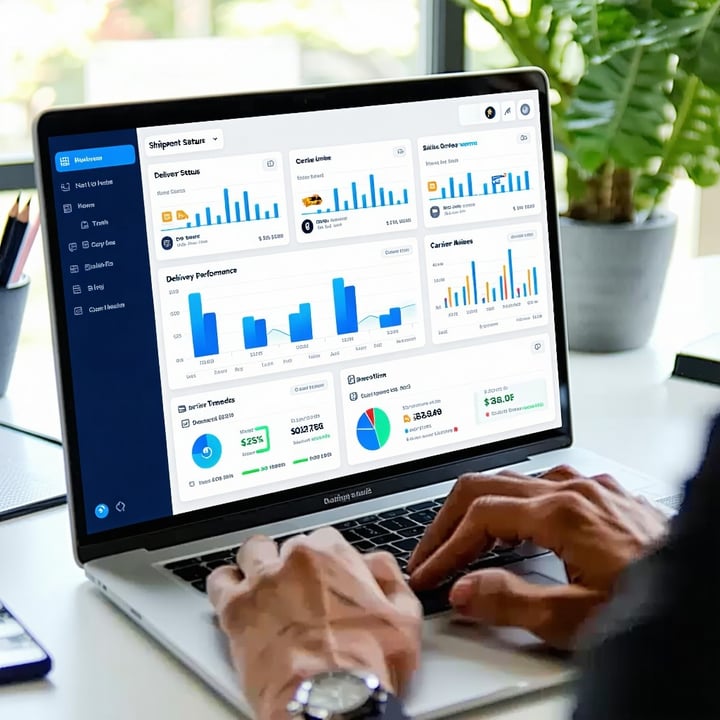
Centralized dashboards standardize multi-carrier data feeds using AI classification, eliminating duplicate scans and out-of-sequence events that obscure delivery status.
-
Sharing shipment context across logistics, warehouse, and CX teams speeds issue resolution because each team operates from identical shipment history.
Introduction
Every brand wants customers to feel confident about their purchase, and much of that confidence is shaped after checkout. You can put considerable effort into your website, product experience, and fulfillment process, but once an order is on its way, the customer is largely waiting for it to be delivered. That makes delivery one of the most visible parts of the post-purchase experience.
You cannot control every event between dispatch and delivery, but you can control how much uncertainty the customer has to deal with along the way.
Timely updates and accurate tracking information tell customers where their order is and what to expect next. When that information is missing, the same uncertainty quickly turns into WISMO (“Where Is My Order?”) queries, adding avoidable pressure on your support team.
This is where post-purchase management software becomes useful. A shipment tracking platform gives you visibility across the delivery journey and helps turn that information into timely customer communication.
When customers can find the answers they need on their own, support volume drops and their confidence in the delivery process grows. The sections below look at the practices that help you make better use of that visibility.
8 Best Practices to Enhance eCommerce Customer Experience from Shipment Tracking Platform
Shipment tracking can do more than show customers where an order is. Good tracking practices reduce WISMO volume, give teams better visibility into delivery performance, and create useful touchpoints between checkout and delivery.
The eight practices below show how to use shipment data to improve both the customer experience and the work happening behind it.
| Best Practice | Core Idea | Customer Experience Impact |
| 1. Centralized Dashboard | Bring shipment data from multiple carriers into one operational view. | Makes delivery issues easier to identify and resolve. |
| 2. Real-time Notifications | Keep customers updated through relevant communication channels. | Reduces WISMO (Where Is My Order?) queries and delivery uncertainty. |
| 3. Make Tracking Information Meaningful | Give customers useful context around each shipment status. | Helps customers understand what is happening and what to expect next. |
| 4. Turn the Tracking Page into a Branded Experience | Use the tracking page as part of your owned customer experience. | Creates an opportunity for engagement beyond basic status updates. |
| 5. Display an Estimated Delivery Date (EDD) | Show when the customer should expect the order. | Sets expectations before purchase and gives customers a reference point after checkout. |
| 6. Communicate Delays Proactively | Tell customers when the expected delivery changes. | Prevents an operational problem from becoming a communication failure. |
| 7. Give Teams Shared Shipment Context | Make shipment information available across logistics, warehouse, and CX. | Speeds up issue resolution and reduces internal handoffs. |
| 8. Use Tracking Data to Improve Delivery Performance | Turn shipment data into carrier, route, and SLA insights. | Helps address recurring delivery problems at their source. |
1. Provide a Centralized Dashboard
When you use multiple carriers, shipment data arrives in different formats. One carrier calls an event "out for delivery," another uses a different label for the same stage, and a package moving through more than one carrier can pick up conflicting updates. A tracking platform pulls these feeds together and standardizes them into one view your team can actually read.
This standardization is getting better with AI. It can classify an unfamiliar carrier event and map it to the right stage. It can also clean up common data problems, such as duplicate events during a carrier handoff, out-of-sequence scans, or a status that stops updating while the package is still moving.
Key Pointers:
-
Bring shipment data from all carriers into one standardized view.
-
Standardize carrier-specific labels into consistent shipment stages.
-
Use AI to classify unfamiliar carrier events and map them to the right stage.
-
Catch duplicate scans from carrier handoffs and status gaps where a package stops updating.
-
Compare carrier performance on the same delivery metrics.
-
Monitor SLAs, delayed shipments, and stuck packages from one place.
2. Send Real-Time Notifications
WISMO queries usually start with a simple information gap: the customer does not know where the order is or whether it is still on schedule. Timely notifications close that gap before the customer needs to contact support.
Email is the backbone of transactional updates in the US, and it is where most customers expect order and shipping confirmations to land. Around 73% of consumers welcome texts confirming an order, so SMS is a strong second channel for the moments that are time-sensitive, like a package going out for delivery. Offer both, let customers choose, and keep each message tied to a real change in the order's status.
Key Pointers:
-
Send updates at the moments customers care about: order confirmed, shipped, out for delivery, and delivered.
-
Use email as the core channel for order and shipping confirmations.
-
Offer SMS for time-sensitive alerts like out-for-delivery and delivered.
-
Let customers choose their channel and manage their preferences.
-
Tie each notification to a real status change so updates stay worth opening.
3. Make Tracking Information Meaningful
More tracking events do not make a better experience. A customer can scroll through a dozen carrier scans and still not know when the order will actually arrive.
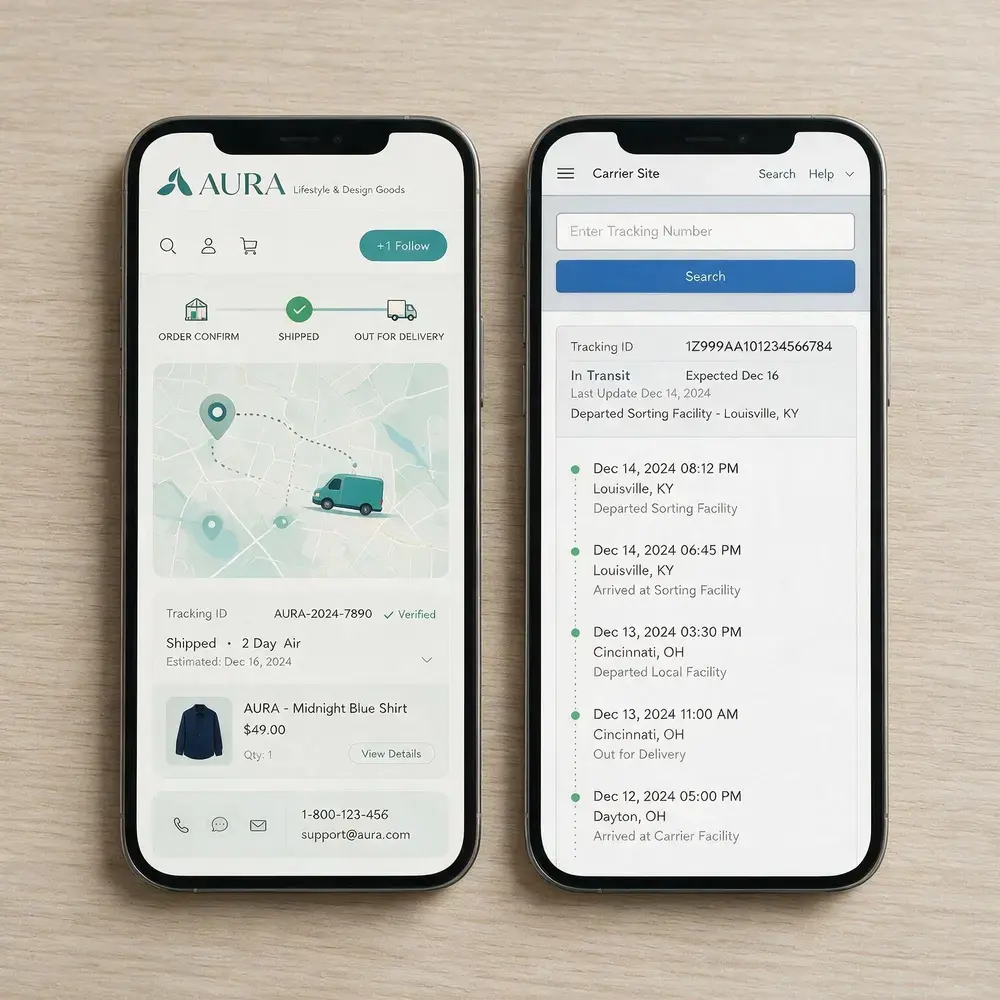
What helps is context. Tell the customer the current stage, what it means for them, and when the next step should happen. "In transit" on its own says little. "Arrived at the Dallas facility, expected out for local delivery tomorrow" answers the question the customer was about to ask.
Key Pointers:
-
Use plain, customer-friendly names for each shipment stage.
-
Pair each status with what it means and what happens next.
-
Give a specific location and timing when the data supports it.
-
Flag packages that have sat at one stage longer than expected.
-
Keep the tracking view readable in a few seconds on a phone.
4. Offer Tracking Numbers That Inspire Trust
Handing customers a tracking number and nothing else sends them straight to a generic carrier page: no branding, no products, no control over what they see. That page is a missed opportunity, because customers spend real time on it.
McKinsey's US consumer research found that about 50% of shoppers actively track order status to confirm their shipment is on time. When that many people are checking, the page they land on is worth owning.
A branded tracking page lets you keep the delivery information front and center while making the rest of the page work for you. You control the look, and you can add genuinely useful content around the status, such as care guidance for what they bought or a few relevant recommendations.
Key Pointers:
-
Replace the carrier's generic page with a branded, mobile-first tracking page.
-
Keep shipment status and delivery timing the most prominent thing on the page.
-
Add useful extras like product care tips or relevant recommendations, kept secondary to the status.
-
Carry your branding through so the post-checkout experience still feels like your store.
-
Give customers a clear next step once the order arrives, like leaving a review.
5. Display an Estimated Delivery Date (EDD)
An accurate Estimated Delivery Date does two jobs. Before purchase, it helps the customer decide whether the timing works. After purchase, it becomes the promise they measure the delivery against.
Calculate the EDD dynamically from current carrier and service-level data. A static estimate turns into a broken promise the moment a shipment slips, and a broken EDD is one of the fastest ways to generate a support ticket.
Key Pointers:
-
Show the EDD at checkout and on the tracking page.
-
Calculate it from current carrier and service-level data.
-
Update the date automatically when conditions change.
-
Make the delivery window clear before the customer pays.
-
Compare promised against actual dates to catch recurring gaps.
6. Communicate Delays Proactively
A delay is frustrating. Finding out about it only after the delivery date has passed is worse, and it is usually the version that ends with the customer deciding not to order again.
Proactive communication lets you reset the expectation before the customer has to come looking. It also means that when they do reach out, your support team is already working from the same information the customer has.
Key Pointers:
-
Alert customers as soon as a shipment is likely to miss its original EDD.
-
Give the revised delivery date whenever you have it.
-
Explain the cause in plain terms, without dumping operational detail.
-
Make sure support sees the same delay information the customer got.
-
Track whether proactive alerts actually bring down WISMO contacts.
7. Give Every Team the Same Shipment Context
One delivery problem can touch several teams before it is solved. The warehouse sees a dispatch issue, logistics sees a carrier issue, and support only sees an unhappy customer. When each team is looking at a different system, the problem takes longer to sort out.
Shared tracking data fixes that. Logistics, warehouse, and support all see the same shipment history and current status. Support can answer a question without rebuilding the order's journey from scratch, and a delivery issue that leads to a return or exchange carries its full context with it.
Key Pointers:
-
Give logistics, warehouse, and support one shared view of shipment status.
-
Let support see the full shipment history before they reply to a customer.
-
Alert the right team when a package stalls or misses a scan.
-
Make it clear who owns a shipment that needs someone to step in.
-
Connect delivery data to returns and exchanges so context carries over.
8. Use Tracking Data to Improve Delivery Performance
Tracking data keeps earning its value after the order is delivered. Looked at across many shipments, it shows which carriers, service levels, and regions cause the most trouble.
That is the shift from a customer-facing tool to an operational one. If a carrier keeps missing its promise in one region, that pattern can drive how you allocate shipments. If delays cluster around a specific handoff, the real problem is probably upstream of where the customer noticed it.
Key Pointers:
- Compare promised against actual delivery performance by carrier.
- Find the regions and service levels with repeat delays.
- Look at performance stage by stage, not just at the final outcome.
- Feed delivery data into carrier allocation and routing decisions.
- Watch trends over time instead of reacting to one late order at a time.
Expert Insight from ClickPost
Tracking is often treated as a customer-facing visibility layer. But the same shipment data can tell a brand much more than where an order is. Carrier scans, delivery events, and stalled shipments are signals about what is happening across the network. The question is whether your system simply passes those signals to the customer or uses them to trigger action.
That distinction separates a tracking page from a post-purchase system that acts on what it sees. A tracking page tells you where the package is. A system that acts can use the same information to flag a shipment that is likely to miss its promise, alert the customer, or show where a carrier is underperforming on a particular lane.
Over time, this data also gives you a clearer picture of actual carrier performance, based on what happens to shipments rather than what an SLA promises on paper.
For a US brand working across multiple carriers, that visibility shapes decisions well beyond customer communication. It can reduce avoidable delivery problems, improve carrier allocation, and catch issues before they ever reach the buyer. Tracking becomes far more valuable when the signals it collects lead to action, not just updates.
Empower Your Customers with ClickPost Shipping Automation
ClickPost is a SaaS logistics solution provider for domestic and international e-commerce companies. It comes pre-integrated with more than 450 carriers and a centralized dashboard to manage orders across delivery partners. The software solutions offer powerful APIs to send and receive data between teams and internal processes. ClickPost can help you simplify shipping and rule out manual shipping methods in the logistics process with its automation capabilities.
It has the Returns Pro and Returns Plus platforms for businesses to handle sort reverse logistics operations. One can get in touch with the ClickPost team to gather more about its offerings and align their business efforts with it. It is a single API solution for all your last mile logistics needs.
Final Word
ClickPost brings the operational and customer-facing sides of post-purchase into one platform. You can use shipment data to monitor delivery performance, keep customers updated, and manage what happens when an order does not go to plan.
The tracking experience combines branded pages, milestone updates, and EDDs with AI-assisted customer communication. The information you see about a shipment can then shape what the customer receives, whether that is a routine delivery update or a message about a delay. You can also use the tracking page for relevant product recommendations, product guidance, and other post-purchase content.
Returns use the same approach. ClickPost supports catalog-wide exchanges, including size and variant swaps, so customers can move to another product without starting a new purchase. Exchange nudges, customer-specific return policies, store credit, and other resolution options give you more ways to handle a return based on the customer and the order.
This connects shipment information, customer communication, and returns within the same post-purchase workflow. You can use what happens at each stage to inform what happens next, rather than treating delivery and returns as separate customer interactions.
Frequently Asked Questions
How does a shipment tracking platform improve customer experience?
A shipment tracking platform improves customer experience by giving customers timely, useful information about their order throughout delivery. It can send proactive updates, show an accurate delivery date, and provide a branded tracking experience instead of sending customers to a carrier's generic page. About 50% of US consumers track their orders to make sure the shipment is progressing and remains on time, making tracking an important part of the delivery experience.
What is the difference between basic order tracking and a full shipment tracking platform?
Basic order tracking gives the customer a tracking number and shipment status. A full shipment tracking platform manages the data and customer experience around that shipment. It can standardize carrier data, automate notifications, provide a branded tracking page, and turn delivery information into operational insights. In short, basic tracking shows where the package is; a tracking platform helps you act on what that information tells you.
How can I automate shipment notifications to improve customer satisfaction?
Automate shipment notifications by triggering messages from key events such as order confirmation, shipment, out-for-delivery, delivery, and significant delays. Email remains the leading channel for transactional communications in the US, while SMS is useful for time-sensitive updates.
How does real-time shipment tracking reduce WISMO calls?
Real-time shipment tracking reduces WISMO (“Where Is My Order?”) calls by closing the information gap that causes customers to contact support. Proactive updates can tell customers when an order has shipped, reached the next delivery stage, or is delayed. A self-service tracking page gives them another way to find this information without contacting your support team.
My customers keep emailing about delayed orders even when tracking is available. What am I doing wrong?
If customers still email about delays despite having tracking access, the problem may be that the information is available but not useful enough. A tracking page that only shows the latest carrier scan still leaves customers to interpret what the status means. Proactive alerts should flag meaningful changes, especially when an order is likely to miss its promised delivery date, and give the customer an updated expectation
What features should a shipment tracking platform have to improve post-purchase experience?
The core capabilities are carrier data standardization, proactive notifications, a branded tracking page, dynamic estimated delivery dates, and delivery performance analytics. Together, these capabilities help you give customers clearer delivery information while giving your operations team better visibility into carrier and shipment performance. If returns are part of the same platform, connecting delivery and returns data can also give you a more consistent post-purchase workflow.
How do I set up a branded tracking page for my Shopify store?
You can set up a branded tracking page by connecting your Shopify store to a post-purchase or shipment tracking platform. The platform pulls shipment data into a tracking experience that uses your brand identity instead of sending customers to a carrier's generic tracking page. You can then add relevant content such as product recommendations, care guidance, or review prompts alongside the delivery information.
Does proactive delivery notification reduce ecommerce returns?
Proactive delivery notifications can reduce delivery-related dissatisfaction by keeping customers informed when an order is on schedule or when its expected arrival changes.
They are more likely to influence delivery-related contacts, cancellations, or refused deliveries than product-driven returns such as size, fit, or preference. Pairing accurate delivery dates with clear communication can therefore support the broader post-purchase experience, but notifications alone are not a general solution for ecommerce returns.
What tracking touchpoints should I automate to improve customer satisfaction after an order ships?
After an order ships, automate updates for major delivery events: out for delivery, delivered, and meaningful delays or changes to the promised delivery date.
You can also notify customers when a shipment reaches important milestones if those events add useful context. Keep each message tied to a real change in the delivery journey so customers receive information they can act on rather than a stream of low-value carrier scans.
Can a shipment tracking platform help small US businesses compete with Amazon's delivery experience?
Yes. A shipment tracking platform can help smaller US retailers close part of the post-purchase experience gap with Amazon by providing proactive notifications, accurate delivery expectations, and a branded tracking experience.
These capabilities give customers clearer visibility even when the retailer relies on third-party carriers. They do not replicate Amazon's logistics network, but they can help a smaller brand deliver a more informed and controlled experience after checkout.




We use cookies to keep the site working, understand usage, and improve your experience. Learn more
Always active for essential site performance and security.
Enables anonymous usage analysis to refine our services.
Used to present relevant promotions and advertising.