.png?width=193&height=27&name=ClickPost%20Logo%20(Blue).png)
.svg)
.svg)
.svg)
.svg)
.svg)
.svg)
.svg)
.svg)
.svg)


.svg)
.svg)
.svg)
.svg)
.svg)
.svg)


.svg)
.svg)
.webp?width=286&height=206&name=ROI%20Calculator%20(1).webp)
.svg)
.svg)

.svg)

.webp?width=286&height=206&name=RTO%20Playbook%20(1).webp)



In this blog
TL;DR Summary
Customer service automation enables ecommerce brands to autonomously resolve high-volume support queries while reducing operational costs and preserving agent capacity for complex interactions.
-
Gartner projects agentic AI will autonomously resolve 80% of common customer service issues without human intervention by 2029, alongside a 30% reduction in operational costs.
-
Self-service interactions cost a median of $1.84 per contact, compared with $13.50 for assisted channels such as phone and email, resulting in significant savings at scale.
-
WISMO inquiries represent the largest automatable ticket category, with Shopify-native order status workflows deployable within a single day of setup.
-
Subscription brands using structured cancellation-retention sequences recover meaningful revenue because automation triggers pause or swap offers before any billing changes are executed.
-
Brands achieving higher CSAT scores pair fast, automated resolution with clean human escalation paths, making handoff design a primary performance variable rather than a secondary one.
The Problem Automation Was Built to Solve
Every ecommerce operator is familiar with the peak-season support crunch. Ticket volume multiplies, queues stretch from minutes to hours, and the options are limited: bring in emergency seasonal staff or accept slower response times. Both carry costs, and slow support has downstream effects on the metrics that determine whether a brand retains customers: repeat purchase rate, customer lifetime value, and CSAT scores that influence public reviews.
Customer service automation addresses this problem directly. When implemented with intent, it absorbs repetitive, high-volume queries that fill a support inbox, allowing agents to devote their time to interactions that genuinely require human judgment. When implemented carelessly, it produces a worse experience than a human-only queue. The difference between those two outcomes comes down to design and sequencing.
This guide is written specifically for ecommerce and direct-to-consumer brands. It covers what customer service automation is, why it matters, and how to implement it in a sequence that produces measurable results rather than costly setbacks. Readers who are still evaluating whether to automate at all should start with the benefits and cost data. Those who have already decided and want an execution framework should move directly to the implementation section.
What Is Customer Service Automation?
Customer service automation refers to the use of technology, including AI chatbots, automated ticket routing, and self-service portals to handle routine support tasks without requiring direct human involvement. The practical outcome is that a customer can check an order status, initiate a return, or verify a discount code at any hour and receive an accurate response in seconds. Meanwhile, an agent handles damaged-package claims or billing disputes that require judgment and relationship management.
How Does Customer Service Automation Work?
Regardless of how a platform is marketed, virtually every automated support system runs the same four-stage process:
-
The customer initiates contact through a chat widget, email, social DM, or phone call.
-
AI identifies intent using natural language processing. The system reads the message, classifies what the customer is asking for—order status, return request, billing question —and attaches a confidence score to that classification.
-
The system resolves or escalates. If confidence is high and the issue falls within defined resolution parameters, the automation responds or takes an action, such as pulling a live order status directly from Shopify. If confidence is low or if the language signals frustration, the ticket routes to a human agent with full context attached.
-
The resolution is logged, and the model learns. Every interaction feeds back into the system to refine intent classification and improve automation rules over time.
That fourth step is where many teams fall short. A system that logs and learns gradually improves its containment rate; one that does not remains a static rule set that becomes less relevant as product lines and customer language evolve.
Where the market is heading: The directional trend is well established. According to a March 2025 Gartner press release, agentic AI is projected to autonomously resolve 80% of common customer service issues without human intervention by 2029. It is also predicted to reduce operational costs by 30%. The question for an ecommerce brand is how quickly and carefully to move toward it.
The Three Generations of Customer Service Automation
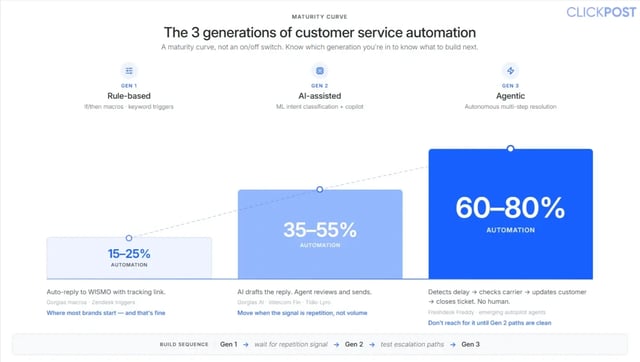
It is more accurate to think of automation as a maturity curve than as a binary capability. Most brands move through three stages, and understanding which stage you occupy tells you what to build next.
| Generation | Technology | DTC Example | Typical Automation Rate | Representative Tools |
| Gen 1: Rule-based | If/then macros, keyword triggers | Auto-reply to order status queries with a tracking link | 15–25% | Gorgias macros, Zendesk triggers |
| Gen 2: AI-assisted | ML intent classification, Copilot suggestions | AI drafts a reply; the agent reviews and approves it | 35–55% | Gorgias AI, Intercom Fin, Tidio Lyro |
| Gen 3: Agentic | Autonomous multi-step resolution across connected systems | AI detects a delay, queries the carrier, updates the customer, offers a remedy, and closes the ticket without agent involvement | 60–80% | Freshdesk Freddy, emerging autopilot agents |
Generation 1 is a sound starting point. A small number of well-configured macros triggered by common keywords can take a meaningful load off a queue with minimal implementation risk. The signal to move toward Generation 2 is not ticket volume alone; it is repetition. When agents are spending significant time composing the same replies rather than handling genuinely complex cases, AI-assisted drafting creates real efficiency.
Generation 3 is where the current wave of agentic tooling operates. An agentic system goes beyond suggesting responses. It chains steps across fulfillment data, carrier feeds, and CRM records to resolve a delivery exception from start to finish. The capability is substantial, but so is the handoff risk if escalation paths are not properly designed first. Reaching for Gen 3 before Gen 2 escalation logic is stable tends to lead to the failures this guide aims to prevent.
The Real Benefits of Customer Service Automation
The following benefits are supported by primary source data, not vendor marketing claims.
Round-the-clock availability without proportional staffing cost
An automated system handles a tracking query at 2 a.m. on a holiday, with no agent logged in. A significant share of ecommerce browsing and purchasing occurs outside standard business hours. This means after-hours automation directly captures service moments that a human-only model would miss or delay.
Faster first response times
A contained automation responds in seconds. A human queue during a high-volume period, a flash sale, a carrier disruption, or a product launch, which can take hours. First response time is one of the most direct levers on CSAT scores, and the gap between automated and human responses in peak conditions is substantial.
Lower cost per interaction
Gartner's benchmark data puts the median cost per contact at $1.84 for self-service and $13.50 for assisted channels such as phone, chat, and email. The cost differential is significant at scale, but it is contingent on a meaningful containment rate. Containment rate refers to the proportion of automated interactions that fully resolve without escalation. Automation that deflects tickets without resolving them does not capture these savings. It generates repeat contacts that are more expensive to handle than the original query would have been.
Improved agent effectiveness and retention
When the queue contains a high proportion of identical, low-judgment queries, agents spend their time on tasks that do not use their skills. Automation that clears repetitive volume changes what an agent's workday looks like. Take XBert by Nextiva, an AI receptionist, as an example: it answers common questions, books or reschedules appointments, and routes the caller to the right person only when the situation needs a human's judgment. The repetitive calls come off agents' desks, and what's left for them is the work that needs a person.
That shift tends to show up in both retention rates and the quality of handling on complex cases, because agents are less fatigued when they reach them.
Peak-season scalability without emergency staffing
Automation absorbs demand spikes without a linear increase in headcount. A brand whose automated layer handles several thousand tickets per week at normal volume can process a multiple of that during a sale period without a seasonal hiring process. This is the specific use case where the cost comparison between automation and staffing is most decisive. Ecommerce automation at the operations level compounds these gains further when logistics and fulfillment systems are coordinated alongside support.
Positive CSAT outcomes, under the right conditions
Brands that pair fast automated resolution with a well-designed human handoff frequently achieve higher CSAT than brands running slower human-only queues. This outcome is conditional, however. Automation without a clean escalation path tends to lower satisfaction, sometimes materially. The handoff design determines whether the CSAT outcome is positive or negative. It is not a secondary concern.
The Five Highest-Volume Ticket Types and How to Automate Each
The most effective automation strategies for ecommerce brands are built around specific, recurring ticket categories. The following five deliver the highest return when automated in order of implementation complexity.
1. WISMO: Order Status Inquiries
WISMO (Where Is My Order?) is typically the largest-ticket category for an ecommerce brand. The resolution flow is straightforward: the customer asks about their order, the system classifies the request, retrieves the order from the customer's profile, queries Shopify fulfillment data, and returns the current status with a carrier tracking link. When the system detects an exception, such as a delay or a lost shipment, it routes to a human agent. The relevant context is pre-loaded; rather than attempting a resolution, it cannot be completed.
A Shopify-native order status widget can establish this flow within a day of setup time. The deeper prevention lever is upstream: accurately estimated delivery windows and proactive status notifications reduce WISMO ticket creation at the source. Order tracking visibility is the operational foundation here.
2. Return and Exchange Requests
Returns are the second-largest automatable category, and the one customers evaluate most critically. The automation handles eligibility checking against your return window and excluded item list, RMA generation, and prepaid return label issuance, where applicable, while logging exchange preferences.
Everything within those defined parameters runs without agent involvement. Damage disputes, fraud-adjacent situations, and policy exception requests fall outside that scope and remain with a human agent. A well-structured returns flow converts what is often perceived as a loss moment into a retained-revenue outcome when exchange preferences are captured and actioned promptly.
3. Discount Code and Promotion Queries
These queries spike two to five times during sale periods precisely when agent capacity is most constrained. The automation checks the submitted code against active promotions and confirms conditions and validity. If a code has expired, it routes the request to an agent with a summary of currently active offers. This enables the agent to salvage the sale rather than simply deliver a negative response.
4. Subscription Management: Cancel, Pause, and Modify Requests
For subscription brands in categories such as beauty, supplements, coffee, and pet, subscription management automation quietly protects revenue across three types of requests. A cancellation request triggers a structured retention sequence; it offers a pause, a product swap, or a one-time incentive before any change is executed. Subscription businesses that offer pauses see 25% of would-be churners pause instead of canceling, with 70–80% of paused customers reactivating within 30 days.
A well-designed retention automation sequence recovers 10–34% of cancellation-intent interactions for well-optimized flows. This ensures that the agent's time is reserved for escalated cases that the flow could not resolve. Pause and modification requests, such as changing delivery frequency or updating a shipping address, are processed directly in the billing platform without agent involvement. Requests outside the defined parameters are routed to an agent.
5. Post-Purchase Review and Feedback Requests
Review and feedback requests are proactive rather than reactive. A sequence fires five to seven days after confirmed delivery, requesting a review by email or SMS. If a low rating is returned, the account is flagged for agent outreach before the review becomes public. This automation represents the link between support operations and brand reputation management. It works most effectively when the post-purchase experience is treated as a connected system rather than a series of isolated touchpoints.
Five Core Building Blocks of Customer Service Automation
Most automation strategies for ecommerce brands combine several of the following building blocks rather than deploying a single technology in isolation.
AI Chatbots
Conversational systems that use natural language processing to interpret free-text queries and respond accordingly. For ecommerce, an effective chatbot goes beyond a scripted FAQ widget. It accesses live order data, policy rules, and customer history to answer questions like 'Can I return this if it does not fit?' in real time. The quality of the underlying data integrations determines how useful the response is. Understanding AI chatbot pricing is an important early step when evaluating these tools against your support budget.
Automated Ticket Routing
A rules-based or AI-driven classification layer that assigns incoming tickets to the appropriate queue without manual triage. In practice, tickets containing terms associated with damage or refund requests route to senior agents, while order status queries automatically trigger the WISMO resolution flow. This reduces the time agents spend on intake and ensures complex cases reach capable handlers without delay. AI agent assist tools sit directly within this layer, surfacing relevant context to agents at the moment of escalation.
Self-Service Portals
Customer-facing knowledge bases and account dashboards that allow customers to resolve queries independently. The most effective version for ecommerce is a branded post-purchase tracking page, accessible directly from the shipping confirmation email without a login, that meets customers when they are already looking for an update. It shows real-time shipment status, surfaces return eligibility once an order is delivered, and lets customers act on either without contacting support. A well-built portal reduces ticket creation at the source, which is a more cost-efficient outcome than resolving tickets through automation after they are submitted.
Automated Email and SMS Sequences
Trigger messages tied to order journey milestones. A standard, high-return sequence includes a shipping confirmation, a delivery confirmation with a review request approximately 5 days post-delivery, and a win-back message if no second purchase is recorded within 30 days. (That said, the number of days varies by product. The 5-day default is simply a reasonable middle ground for general ecommerce.) Proactive delivery notifications in this sequence also function as WISMO prevention. Customers who receive status updates proactively submit fewer reactive status queries.
Voice AI and IVR
Phone-based automation that routes callers and, in Generation 3 systems, resolves inquiries through voice interaction. This component is less central for pure-play direct-to-consumer brands but is relevant for omnichannel retailers operating call centers alongside chat and email support.
In 2026, the boundaries between these five categories have narrowed. Modern agentic platforms increasingly consolidate them into a single orchestration layer, simplifying the customer experience and reducing the number of point-solution vendors a brand needs to manage.
How to Implement Customer Service Automation: A Six-Step Plan
The six steps below provide a structured implementation sequence for ecommerce brands deploying customer service automation. The order in which you implement matters more than the tool you choose. Getting the sequence right allows even a straightforward platform to outperform a more sophisticated one deployed without preparation.
Step 1: Audit Current Ticket Volume and Categories
Export 90 days of tickets from your helpdesk and categorize them by topic. Identify your top five ticket types and the percentage of total volume each represents. This dataset is the foundation for every decision that follows. For brands that have not yet automated WISMO, it typically accounts for 25 to 40% of total volume. A customer service audit checklist can provide a structured framework for this analysis.
Step 2: Define Your Automation Candidates
Strong automation candidates share three characteristics: high volume, a predictable resolution pattern, and no requirement for nuanced human judgment. WISMO queries, discount code checks, and return eligibility assessments nearly always meet these criteria. Damage claims, payment disputes, and emotionally charged complaints nearly never do. Defining this boundary clearly before implementation prevents the more costly process of walking back an automation that was applied to the wrong ticket type.
Step 3: Select a Tool That Fits Your Existing Stack
Tool evaluation should be anchored to your current technology environment. For Shopify merchants, native Shopify integration reduces setup friction significantly and should be weighted heavily. WooCommerce and headless architectures carry different constraints, and brands still deciding on a platform will find that the cost to build an ecommerce website varies enough by architecture that it is worth settling before layering support automation on top. The comparison table later in this guide covers the tools most commonly used by ecommerce and direct-to-consumer brands.
Step 4: Build and Test Before Going Live
Start with your single highest-volume candidate—typically WISMO. Build the flow and test it against 50 to 100 historical tickets before it handles a live interaction. Two questions determine whether it is ready: does it resolve correctly, and does it recognize when not to attempt resolution? A flow without a tested escalation path should not go live.
Step 5: Launch in Parallel, Not as a Replacement
For the first two weeks, run the automation alongside the existing human queue without replacing it. Compare resolution rate, CSAT, and escalation rate between automated and human-handled tickets for the same query types. This parallel period surfaces failure modes that only appear under real-world conditions, while the stakes are still low enough to adjust.
Step 6: Measure, Refine, and Expand
Through the first 60 days, track four metrics weekly: automation rate (the share of tickets resolved without human intervention), CSAT on automated interactions, escalation rate, and cost per ticket. Use these numbers to tune rules and to identify the next ticket type to automate. Automation compounds when iterated carefully; it stalls when treated as a one-time implementation.
The Most Common Failure Point: AI-to-Human Handoffs
According to the Nextiva 2025 CX Landscape Report, a survey of more than 1,000 CX decision-makers found that 98% said a smooth AI-to-human transition is essential. Of those organizations already using AI for customer experience, 90% reported struggling to make those handoffs work effectively.
The failure pattern is consistent. The AI handles part of an interaction, then routes the customer to an agent with no contextual information transferred. The customer repeats their situation from the beginning. Frustration builds, and the CSAT outcome falls below what a slower human-only queue would have produced. This is a design problem, not a technology problem. It is correctable with deliberate escalation architecture.
Four design requirements for a functional handoff:
-
The full conversation transcript is displayed on the agent's screen at the point of escalation.
-
Before routing, the AI tags the ticket with the detected intent, a sentiment indicator, and the resolution steps already attempted.
-
Escalation triggers are explicit: the customer requests a human representative, sentiment analysis flags frustration, or the interaction has reached three or more failed resolution attempts.
-
The agent sees a one-line summary of the issue before responding.
The quality of the data layer underneath automation is what makes the setup possible. When an automated system has access to live fulfillment status and carrier exception data, escalations carry real context. When it does not, it routes a customer to an agent with incomplete information, which forces the agent to gather context before they can act, adding both handling time and customer frustration.
Customer Service Automation Tools: A Comparison for Ecommerce Brands
The appropriate tool depends on your existing stack, team size, and automation objectives rather than on platform marketing reach. The table below provides a neutral comparison of six platforms commonly used by ecommerce and direct-to-consumer brands. Pricing and feature availability change frequently; treat these figures as directional and verify current specifications directly with each vendor before committing.
| Tool | Shopify-native | Starting price (est.) | AI automation rate | Best for | Setup |
| Gorgias | Yes | ~$10/mo | 40-60% | DTC brands on Shopify, 1-50 agents | Low |
| Zendesk | Via integration | ~$55/agent/mo | 30-50% | Mid-market, multi-channel brands | Medium |
| Help Scout | No | ~$20/user/mo | 20-35% | Small, email-first teams | Low |
| Freshdesk | Via integration | Free tier available. | 35-55% | SMBs needing omnichannel | Medium |
| Tidio | Yes | ~$29/mo | 40-60% | Early-stage, chat-first DTC | Low |
| Intercom | Via integration | ~$74/seat/mo | 50-70% (Fin AI) | Growth-stage DTC and SaaS | High |
For most Shopify-based DTC brands with approximately $10M or less in revenue, Gorgias or Tidio is typically the appropriate starting point. Both offer native Shopify integration and low setup friction, which makes them well-suited for WISMO deflection, return initiation, and discount query automation without significant custom development. Zendesk and Intercom support the same use cases but are better-positioned brands for managing higher ticket volumes across multiple channels and require more configuration time and budget to operate effectively.
Disclosure: this guide is published by ClickPost, a post-purchase and logistics intelligence platform. ClickPost has been excluded from the comparison above because it is not a helpdesk product; its function is to supply the order, tracking, and exception data that helpdesk automations depend on to produce accurate responses.
Pre-Launch Readiness Checklist
Before signing up for a platform, run through the following self-assessment. Brands that can confirm seven or more items are ready to begin. For those who cannot, closing the gaps first produces significantly better outcomes than automating on an incomplete foundation.
-
The top five support ticket types have been identified by volume.
-
A help center or FAQ is in place, even a basic one.
-
The Shopify store is connected to a helpdesk platform.
-
Monthly ticket volume is sufficient to justify and test automation, generally 200 or more tickets per month.
-
The team understands that automation handles volume, not relationship-critical interactions.
-
'Successful resolution' and 'needs escalation' have been defined explicitly.
-
An agent is assigned to review automation performance weekly.
-
Return, shipping policy, and FAQ policies are clearly written and up to date.
-
Ticket types that should not be automated have been identified (damage claims, legal matters, fraud cases).
-
The current average first response time serves as the baseline for measuring improvement.
Frequently Asked Questions (FAQs)
What is customer service automation?
Customer service automation is the use of AI, chatbots, automated ticket routing, and self-service tools to handle support interactions without requiring a human agent to respond manually. The aim is to resolve repetitive, high-volume requests like order status, return initiation, and discount queries instantly, while directing agents toward complex, high-judgment interactions.
How does customer service automation work?
It runs through a four-stage process: the customer initiates contact; AI classifies the intent using natural language processing; the system either resolves the request on its own or routes it to a human agent with full context; and the outcome is logged to improve future intent classification and automation rules.
What types of customer service tasks can be automated?
High-volume, pattern-based tasks automate most effectively: order status lookups, return and exchange initiation, discount code checks, subscription changes, and post-purchase review requests. For ecommerce brands where most of those requests arrive through WhatsApp or Instagram DM rather than a website chat widget, WhatsApp chatbot marketing tools handle the same pattern-based automation natively on those channels, where customers are already active and response speed directly affects retention.
In some cases, support teams may also need to request a signed document before resolving these requests or approving exceptions.
Is customer service automation appropriate for smaller ecommerce brands?
It becomes worthwhile once ticket volume is sufficient to justify the setup investment, typically around 200 or more tickets per month, and support policies are clearly documented. Below that threshold, the configuration effort usually outweighs the savings. The higher-return first step for early-stage brands is often to build a well-organized help center and self-service tracking page.
Will customer service automation replace human agents?
No. The realistic outcome is that automation handles repetitive, high-volume work, allowing agents to focus on complex, emotionally sensitive, or high-stakes interactions. Most CX leaders plan to retain their human teams and shift their focus to higher-value work. This is because the interactions that most affect customer loyalty are precisely the ones automation should not handle.
What is the difference between AI customer service and rule-based automation?
Rule-based automation operates on fixed if-then logic and keyword triggers. It handles only the scenarios you have explicitly scripted. AI customer service interprets free-text intent through natural language processing, manages phrasing it has not seen before, and can take multi-step actions across connected systems. Most mature setups combine both rules for predictable cases and AI for everything more variable.
What does customer service automation cost?
Most ecommerce helpdesk platforms with automation capabilities start at the low-tens-of-dollars per month and scale based on seats, ticket volume, or resolved interactions. The economic case is most evident at the interaction level: Gartner benchmarks the median cost per agent-assisted contact at $13.50 and per self-service contact at $1.84. These figures are directional; actual savings depend on containment rate and the complexity of tickets in scope for automation.
What is the most significant risk in customer service automation?
A poorly designed AI-to-human handoff. The Nextiva 2025 CX Landscape Report found that 98% of CX decision-makers described smooth AI-to-human transitions as essential, while 90% of organizations already using AI for customer experience reported struggling to achieve them. When the AI routes a customer to an agent with no context transferred, the customer repeats their situation, frustration increases, and CSAT declines. Designing the escalation path with the same rigor as the automation itself is non-negotiable.
The Bottom Line
Customer service automation for ecommerce brands in 2026 is not a question of whether to implement it. It is a question of which ticket types to automate, in what order, and with what level of care on the handoff. WISMO is nearly always the right starting point as it is the largest category for most brands and produces a clean, verifiable return. Understanding the full scope of how to improve customer service in ecommerce provides the broader context within which automation decisions should be made.
Running new flows in parallel before replacing human handling is not optional; it is the mechanism that surfaces failure modes before they reach customers at scale. And the AI-to-human handoff is not a configuration detail. It is the single design decision that most directly determines whether automation improves or harms your CSAT.
The brands that achieve sustainable results from automation are not necessarily those with the most sophisticated tooling. They are the ones that automate the right categories on a reliable data foundation and maintain human judgment where it counts. The automation builds from there.