.png?width=193&height=27&name=ClickPost%20Logo%20(Blue).png)
.svg)
.svg)
.svg)
.svg)
.svg)
.svg)
.svg)
.svg)
.svg)


.svg)
.svg)
.svg)
.svg)
.svg)


.svg)
.svg)
.webp?width=286&height=206&name=ROI%20Calculator%20(1).webp)
.svg)
.svg)

.svg)

.webp?width=286&height=206&name=RTO%20Playbook%20(1).webp)

Ready to ship smarter? Talk to our logistics experts.
Trusted by 600+ brands
In this blog
TL;DR
Creating a UPS Shipping Label Online is straightforward. Enter the ship-from and ship-to details, add the package weight and dimensions, choose the UPS service you want, pay, and print the label on UPS.com. This guide covers the basics, including what UPS is, which shipping services it offers, why businesses use the UPS platform, what information you need before creating a label, and which printers make the process easier.
Key points:
- You can create a UPS shipping label on UPS.com by logging in or continuing as a guest.
- UPS accepts packages up to 150 lbs, with standard maximum size limits that affect online label creation.
- The label flow asks for sender and recipient details, package weight and dimensions, service choice, and payment.
- UPS.com supports standard desktop laser and inkjet printers, and it is also compatible with many 4" x 6" thermal label printers.
- If a label is unused, UPS says you can generally void it within 90 days of creation.
Why You Need to Know How to Print a UPS Shipping Label Correctly
Printing a UPS label online is one of those tasks that seem simple until a shipment is rated incorrectly, a barcode does not scan, or a sender realizes too late that the dimensions were entered incorrectly.
The good news is that UPS has made the label-creation process fairly direct on its website. Once you understand the information UPS needs and the few details that affect billing, creating and printing labels online becomes less of a chore and more of a repeatable workflow. Just like learning how to print shipping labels for small business operations, mastering the UPS label flow helps reduce costly errors and speeds up your ecommerce fulfillment process.
What is UPS and Why Do Businesses Use It for Shipping?
UPS, or United Parcel Service, is one of the world's largest parcel and logistics carriers. It offers domestic and international package shipping, time-definite air services, ground delivery, freight solutions, and shipping tools for businesses and individual shippers. UPS is a carrier that covers everything from standard parcel delivery to faster express options and specialized logistics support.
For practical shipping purposes, UPS is especially relevant when package size and weight exceed what lighter postal products are designed for. UPS states that standard packages can weigh up to 150 lbs and measure up to 108 inches in length, with a maximum of 165 inches in length plus girth before freight rules apply. That makes UPS a common choice for heavier ecommerce shipments, consumer electronics, home goods, and other parcels that need more capacity than lighter postal services typically allow. Many businesses compare FedEx vs UPS or evaluate best shipping carriers to find the right fit for their volume and budget.
Sources: UPS Shipping Services, UPS Domestic Shipping, UPS Shipping Dimensions and Weight
What UPS Shipping Services Can You Choose When Creating a Label?
UPS offers a broad mix of domestic and international services. So, the exact label you create depends on how fast the shipment needs to move and where it is going. UPS service pages group them into standard, expedited, and express categories rather than presenting them as one-size-fits-all parcel options.
- UPS Ground for standard domestic shipping, typically used for cost-effective day-definite delivery inside the U.S. network. Learn more about what is UPS Ground shipping and when to use it.
- UPS 3 Day Select for shipments that need delivery within three business days in the contiguous U.S.
- UPS 2nd Day Air and 2nd Day Air A.M. for faster domestic delivery on tighter timelines, similar to other 2-day shipping ecommerce options.
- UPS Next Day Air services for urgent domestic shipments that need next-business-day delivery. If you're comparing overnight options, check out our guide on what is UPS Next Day Air Saver.
- UPS Worldwide Expedited, Worldwide Express, and Worldwide Saver for international shipments with faster time-definite delivery windows.
- UPS Express Critical and urgent freight solutions for highly time-sensitive special cases.
The key point is that the service you choose while creating the label affects cost, transit time, and sometimes package-handling rules. That is why UPS asks for dimensions, weight, and destination before it shows the available service options. Understanding these choices helps reduce shipping cost and avoid unnecessary shipping delays.
Source: UPS Shipping Services, UPS Domestic Shipping, UPS International Shipping Services, UPS Urgent Services
Why Should You Create UPS Shipping Labels Directly on the UPS Platform?
Creating labels directly on UPS.com has a practical advantage. The shipping flow is built around UPS’s own service logic. That means you can estimate cost, compare available shipping services, pay online, and generate the label in one place instead of bouncing between tools. UPS’s shipping portal explicitly positions UPS.com as a place to quote, pay, and get labels online.
A few specific advantages stand out:
- Service selection is built into the workflow. So, you can choose the delivery option that fits the shipment.
- Online rate calculation, which lets you estimate costs before buying the label.
- Tracking visibility: Labels created through the UPS link directly to the UPS tracking system, similar to how package and parcel tracking software works.
- Void capability for unused shipments, which matters if a label was created in error.
- Potential access to shipping discounts, depending on account type, negotiated pricing, or business shipping setup.
For businesses that ship regularly, the greater advantage is consistency. The more often you create labels, the more valuable it becomes to use a system that stores shipment history and follows UPS's current rating rules instead of relying on manual workarounds. Many businesses integrate UPS with ecommerce shipping software or multi-carrier software to streamline label creation across multiple carriers.
Source: UPS Shipping, UPS Print Shipping Labels, UPS View Void Shipments, UPS Shipping Cost and Rates, UPS Shipping Quote
How Do You Create a UPS Shipping Label Online Step-by-Step?
UPS’s official label-creation flow is short, but the details matter. At a basic level, you go to the shipment-creation page, enter the sender and recipient details, provide the package information, choose the service, pay, and print the label. You can do this either by logging in or by continuing as a guest.
Here is the simple step-by-step process:
-
Go to UPS.com and open Create a Shipment: UPS directs users to the Create a Shipment flow from the Shipping tab.
-
Log in or continue as a guest: UPS’s own instructions make clear that an account is optional for basic label creation on the website.
-
Enter the ship-from and ship-to information: This includes the sender's and recipient's names and addresses. Accurate address data helps avoid delivery exceptions.
-
Add package details: UPS requires the package weight, dimensions, and any other requested shipment details. These inputs matter because size and dimensional rules affect the rate.
-
Choose the UPS service and any extra options: The available service choices depend on the route and parcel profile. Consider expedited shipping if you need faster delivery.
-
Enter payment and purchase the shipment: Once payment is complete, UPS generates the label.
-
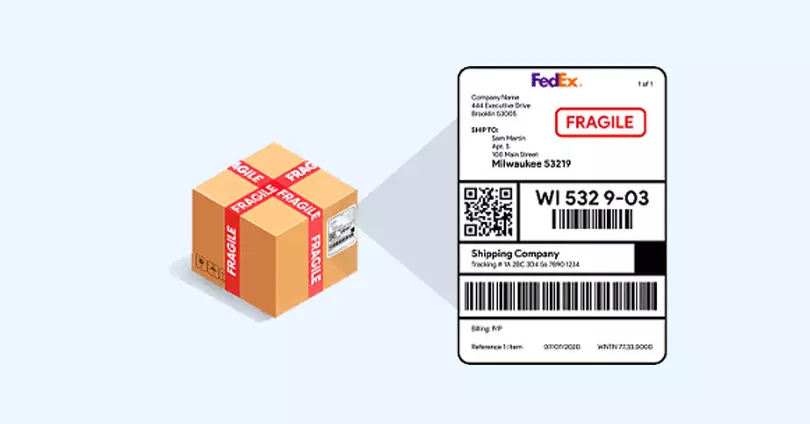
Print the label and attach it securely: UPS says labels can be printed at home or at The UPS Store. The label should be firmly attached and easy to scan. For return shipments, you can also create a UPS return label using a similar process.
If you need to cancel an unused shipment later, UPS says you can generally void it within 90 days of creating the label. After that, different rules apply. This flexibility is especially useful for businesses managing return labels and handling reverse logistics operations.
Source: UPS Print Shipping Labels
What Information Do You Need to Create a UPS Shipping Label?
Most label problems come from bad or incomplete shipment data, not from the printer. UPS’s online flow makes the required inputs fairly clear: it asks for sender details, recipient details, package information, service choice, and payment.
The essentials include:
- Sender name and address so UPS knows the origin and return point.
- Recipient name and full delivery address so the shipment can be rated and routed correctly.
- The package weight is important because UPS rates shipments based in part on weight.
- Package dimensions because dimensional rules and measurement-correction charges that can apply.
- Service level such as Ground, 3 Day Select, or an air product.
- Payment method for completing the purchase and generating the label.
For international shipments, there may also be customs-document requirements after label creation. UPS notes that customs forms and commercial invoices can be uploaded post-shipment to help streamline clearance. If you're shipping globally, review our guides on international logistics and shipping from India to USA for additional requirements.
What Type of Printer Should You Use for UPS Shipping Labels?
UPS's own guidance is straightforward here. UPS.com is compatible with most thermal label printers that print 4" x 6" labels, and UPS also says standard desktop laser and inkjet printers are supported. That means you do not need special hardware to get started.
The best choice depends on volume. For occasional label printing, a normal laser or inkjet printer is fine. For higher-volume shipping, thermal label printers are usually the better workflow because they are built specifically for label stock and reduce the hassle of cutting and taping paper sheets. UPS even notes that thermal printing is part of its shipping-tool ecosystem and references compatible models and setup guides for business shipping tools. Businesses managing high volumes often pair thermal printers with automated shipping systems or courier software to speed up operations.
Source: Thermal Printing of Labels, UPS Setup for Thermal Printer, Thermal Label Installation
Methodology and editorial note
This article was written using current UPS help pages, shipping-service pages, size-and-weight guidance, and UPS label-printing support resources. The goal was to explain UPS Shipping Label Online from a practical, current-use perspective rather than repeating outdated assumptions, especially regarding account requirements and void windows. UPS’s website now explicitly states that label creation can be done either by logging in or by shipping as a guest, so the article reflects that current workflow.
UPS Shipping Label Online in 2025: What You Need to Remember
Creating and printing a UPS shipping label online is not complicated, but accuracy matters. The right address, the right dimensions, and the right service choice all shape the final cost and the odds of a smooth delivery. Once those basics are in place, UPS.com gives you a clean enough workflow to create the label, print it, track the shipment, and void it later if it never enters the network.
For businesses scaling operations, integrating UPS with broader logistics management software or delivery management software can help automate label creation, track shipments across carriers, and reduce manual errors. Whether you're managing shipping for small business or coordinating last-mile delivery solutions at scale, understanding how to create and print UPS labels correctly is a foundational skill.
Frequently Asked Questions About Creating UPS Shipping Labels Online
Do I need a UPS account to create a shipping label online in 2025?
Not always. As per UPS, you can create a shipment on UPS.com either by logging in to your profile or by continuing as a guest. An account is useful for shipping history and saved preferences, but it is not strictly required for basic online label creation.
What information is required to create a UPS shipping label?
You need the sender and recipient details, package weight and dimensions, the UPS service you want, and payment information. UPS uses that data to rate the shipment correctly and generate a valid label for the selected service. Having a clear packing slip helps ensure accuracy during fulfillment.
What printer is recommended for UPS shipping labels?
UPS supports standard desktop laser and inkjet printers, but it also supports thermal label printers that print 4" x 6" labels. For regular shipping volume, thermal printers are usually the cleaner long-term setup because they are designed specifically for label printing.
Can I cancel or modify a UPS label after printing it?
UPS clearly documents the ability to void unused shipments, generally within 90 days of label creation. If shipment details are wrong, the cleaner approach is usually to void the unused label and create a new one with the corrected information. This helps prevent issues like RTO in ecommerce.
What is the maximum package weight UPS accepts for standard shipping?
UPS states that standard packages can weigh up to 150 pounds. That higher limit is one reason UPS is commonly used for heavier ecommerce and commercial parcels that go beyond lighter postal thresholds. If you're comparing carriers, check out our comparison of FedEx vs USPS vs UPS.
Does creating a UPS label online give you access to discounted shipping rates?
It can. UPS's pricing pages note that shipping rates vary by account type and business setup, and many regular shippers use lower commercial or negotiated rates rather than walk-in pricing. The more consistently a business ships, the less sense retail counter rates usually make. Businesses can further reduce costs using carrier allocation strategies and shipping aggregators.




We use cookies to keep the site working, understand usage, and improve your experience. Learn more
Always active for essential site performance and security.
Enables anonymous usage analysis to refine our services.
Used to present relevant promotions and advertising.